
The generated web application requires URL Rewrite, you need to configure your web server to send HTTP requests to your PHP front-controller file, i.e. the index.php.
By default .htaccess files (for Apache) and web.config file (for IIS) will be generated for your web server. You may not need to configure manually. However, if the generated files do not work for your web server, you should check the follows.
Apache
Ensure that the Apache mod_rewrite module is installed and enabled. Ensure your .htaccess and index.php files are in the same directory. The .htaccess file should contain following rewrite rules:
RewriteEngine On
RewriteCond %{REQUEST_FILENAME} !-f
RewriteCond %{REQUEST_FILENAME} !-d
RewriteRule ^ index.php [QSA,L]
Some Apache servers requires RewriteBase directive, you may need to add:
a. If you generate to root folder of your site,
# For the .htaccess under the project folder
RewriteBase /
# For the .htaccess under the "api" folder
RewriteBase /api/
b. If you generate to a subfolder (e.g. "demo2022") of your site,
# For the .htaccess under the project folder
RewriteBase /demo2022/
# For the .htaccess under the "api" folder
RewriteBase /demo2022/api/
If your server requires this setting, you can click Tools -> Advanced Settings and set RewriteBase directive, e.g. / or /demo2022/, then generate .htaccess files again.
Make sure your virtual host is configured with the AllowOverride directive so that the .htaccess rewrite rules can be used. Open your httpd.conf or apache.conf in a text editor, and locate the <Directory> section and change the AllowOverride line to ALL.
If the Apache module mod_authz_core is enabled, make sure you configure the Require directive properly, e.g. Require all granted grants access to all requests.
# DocumentRoot: The directory out of which you will serve your documents.
DocumentRoot "D:/my/path"
<Directory "D:/my/path">
    # ...
    # AllowOverride controls what directives may be placed in .htaccess files.
    AllowOverride All
    # Controls who can get stuff from this server.
    Require all granted
</Directory>
Nginx
This is an example Nginx virtual host configuration for the domain example.com. It listens for inbound HTTP connections on port 80. It assumes a PHP-FPM server is running on port 9123. You must update the server_name, error_log, access_log, and root directives with your own values. The root directive is the path to your application's public document root directory, the index.php front-controller file should be in this directory.
server {
    listen 80;
    server_name example.com;
    index index.php;
    error_log /path/to/example.error.log;
    access_log /path/to/example.access.log;
    root /path/to/public;
    location / {
        try_files $uri /index.php$is_args$args;
    }
    location /api/ {
        try_files $uri /api/index.php$is_args$args;
    }
    location ~ \.php {
        try_files $uri =404;
        fastcgi_split_path_info ^(.+\.php)(/.+)$;
        include fastcgi_params;
        fastcgi_param SCRIPT_FILENAME $document_root$fastcgi_script_name;
        fastcgi_param SCRIPT_NAME $fastcgi_script_name;
        fastcgi_index index.php;
        fastcgi_pass 127.0.0.1:9123;
    }
}
Internet Information Services (IIS)
The URL Rewrite module is not built-in, so you need to download and install the IIS URL Rewrite module from the microsoft web site. After installing, you should see URL Rewrite module in IIS Manager for your web site:
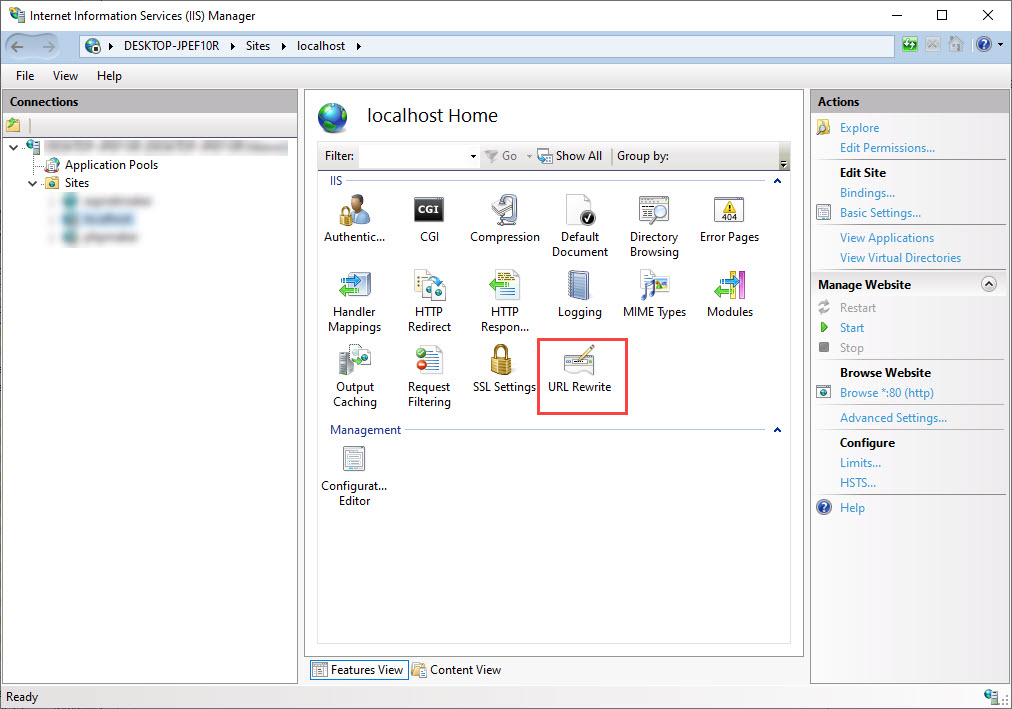
To perform the mapping, you can use the IIS Manager, but it is simpler to use web.config file directly.
Ensure the web.config and index.php files are in the same directory (the project folder). The web.config file should contain this code:
<?xml version="1.0" encoding="utf-8"?>
<configuration>
  <system.webServer>
    <rewrite>
      <rules>
        <rule name="api" patternSyntax="Wildcard">
          <match url="api/*" />
          <conditions>
            <add input="{REQUEST_FILENAME}" matchType="IsFile" negate="true" />
            <add input="{REQUEST_FILENAME}" matchType="IsDirectory" negate="true" />
          </conditions>
          <action type="Rewrite" url="api/index.php" />
        </rule>
        <rule name="slim" patternSyntax="Wildcard">
          <match url="*" />
          <conditions>
            <add input="{REQUEST_FILENAME}" matchType="IsFile" negate="true" />
            <add input="{REQUEST_FILENAME}" matchType="IsDirectory" negate="true" />
          </conditions>
          <action type="Rewrite" url="index.php" />
        </rule>
      </rules>
    </rewrite>
  </system.webServer>
</configuration>
Also See
Web Servers
Apache Module mod_rewrite
Using the URL Rewrite Module (for IIS)