
PHPMaker 2026 is major upgrade from previous version, it includes a long list of new features. If you upgrade from older versions, please be reminded that recent versions introduced some new features which are not fully compatible with old versions, make sure you read the following first:
Migrating to v2024
Migrating to v2025
When opening an old project in v2026, PHPMaker will try to convert the changes for you. However, the conversion cannot be 100% and you'll need to do some updates yourself. Please read the follows carefully, review your code, update and test it before deploying the new scripts to your production server.
System Requirements
Before installing v2026, please ensure that your system meets the updated requirements: ###### .NET Desktop Runtime 8.0 Previous versions of PHPMaker **UI** (not the generated PHP web application) runs on **.NET Framework 4.x**, v2026 uses [.NET Desktop Runtime 8.0.x (x86)](https://dotnet.microsoft.com/en-us/download/dotnet/8.0) to leverage the latest performance improvements, security fixes, and long-term support features. Before installing v2026, make sure you install .NET Desktop Runtime 8.0.x (x86) first. **Note:** There are different versions of .NET runtimes, you should install the **.NET Desktop Runtime** (or SDK, **not** the standard .NET Runtime or the ASP.NET Core Runtime). Also make sure you install the correct version, i.e. **8.0.x (x86)**, installing older or newer versions or x64 versions will **not** work. If you see this error when you install, please install the correct version of .NET Desktop Runtime first: 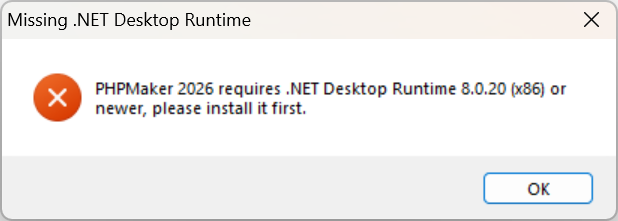 ###### PHP >= 8.2.0 Requires PHP 8.2.0 or higher. Since active support for PHP 8.2 already ended on 2024/12/31 (see [Supported Versions](https://www.php.net/supported-versions.php) on PHP official site), using PHP 8.3 or 8.4 is highly recommended. Also read [Composer](composer.html) and make sure you have the required PHP extensions installed. ###### Composer (v2.5.8 or newer) Requires **Composer v2.5.8 or newer**. If you have **already** installed Composer, you can update to the latest stable version by running the follows in command prompt or Powershell: ###### Node.js (includes npm) Requires either **LTS version ≥ v22.0**, or **Current version ≥ v24.0**: * If installed via the [official installer](https://nodejs.org/en/download), download and install the latest version. * If installed via [NVM (Node Version Manager) for Windows](https://github.com/coreybutler/nvm-windows), you can update to the latest version by running the following in your terminal: * If installed via [Fast Node Manager (fnm)](https://github.com/Schniz/fnm), you can update to the latest version by running the following in **PowerShell**:Symfony Replaces Slim
PHPMaker 2026 uses [Symfony](https://symfony.com/what-is-symfony), the leading PHP framework for building scalable, high-performance websites and web applications. Symfony is a full-stack framework — you get routing, controllers, service container, database abstraction (Doctrine), security, mailer, etc., all under one roof. Due to this architectural change, certain considerations must be kept in mind when migrating an existing project. Please note the following recommendations to ensure a smooth transition: ###### Memory Requirements Symfony loads a full stack of services, bundles, and tools on every request (Dependency Injection container, Doctrine ORM, event listeners, etc.). Adjust PHP memory limits in php.ini according to the environment: | Environment | Recommended Memory Limit | |------------------|------------------------| | Production | 256M-512M | | Development | 512M-1G | Note that development requires more memory due to additional debugging tools and template caching. ###### Write Permissions Symfony needs write access to runtime directories: - `var/cache/` - Stores compiled configs, templates, and metadata to speed up application - `var/log/` - Stores application logs for debugging and monitoring Make sure you set write permissions appropriately, these directories must exist and must be writable by both your web server user and the terminal user (the user running `cache:warmup` or `cache:clear` commands). Read [Setting up or Fixing File Permissions](https://symfony.com/doc/current/setup/file_permissions.html) for more information. ###### Project Structure and Namespace**IMPORTANT: DO NOT** generate or upload a new Symfony project into an **old project folder**.
**Reasons:** - Legacy files with **different namespaces** can **break Symfony's container cache build** - Slim **PSR-15 middleware** is incompatible with Symfony and may cause **fatal errors** - Old **standalone scripts** bypass Symfony's **kernel lifecycle** and **service container** **Note:** The option **Clear project folder first** only deletes previously generated files, it does **not** delete all files. **Recommendation:** - **Always start with a clean project folder**, whether you are **updating an old project** or **starting a new one**. - When deploying to your **production server**: - Deploy into a **fresh folder**, never overwrite an old one, - Update your **web server's document root** to the new folder, - This ensures no outdated or legacy files remain to cause conflicts or errors.Configuration and Container Cache
Symfony's **configuration and container cache** compiles configuration, routing, and services into optimized PHP code, resulting in **fast runtime performance** and **early error detection**. **Benefits:** - Much faster execution in production thanks to precompiled files. - Errors like syntax issues or missing services are caught during build time, not at runtime. - Stable and predictable application behavior. **Impact on development:** - **First request after clearing the cache** takes longer because Symfony must rebuild everything. - **Manual cache clears** are sometimes needed for code or config changes to take effect. - **Strict validation** means services and configurations must be fully correct before the app can run. These behaviors are part of Symfony's design to ensure **long-term stability and performance**. While it may take some time to get used to, being patient and learning how the cache works will make development smoother and help you write **cleaner, more maintainable code**. PHPMaker will clear cache after each generation, so the first request will take longer. If you manually change code after generation, sometimes you may need to clear cache yourself. Read [Debugging](debug.html) for more information about how to debug during migration.Route/API Action Server Events Replaced by Route/API Action Controllers
Routes are now defined using route attributes and link to controller methods (services) rather than closures (anonymous functions) as route handlers, which was the approach in previous versions. When you open old projects in v2026, PHPMaker will try to convert your **Route_Action** and **Api_Action** server events (which used closures) to two controllers, `RouteActionController` and `ApiActionController` as [Custom Files](customfile.html) (for Symfony). If you used simple syntax, your code should be converted to controller actions successfully. Otherwise, you may need to adjust your code to match the expected syntax. After conversion, you can maintain your code in the **Code -> Custom Templates -> Table-Specific -> Custom File -> Content** section of the custom files. With the new format you can modify your route attributes (including security), route parameters (and method arguments), and the route actions easily. For smooth upgrade, PHPMaker will try to make minimal changes to your code, keeping the arguments unchanged. However, to make your code performs better for the long run, you should update your controller action's arguments and the response object as explained below. Similarly, you can add your own controllers to the project by [Custom Files](customfile.html) and implement your own actions. **Do not create standalone scripts** by Custom Files, these files may fail to run or bypass Symfony's container, events, and request lifecycle, causing errors or inconsistent behavior.Routing Changes
In previous versions, routes are already defined as PHP attributes (`#[Route()]`) on controller methods. They are generated by PHPMaker and you probably weren't aware of them. With the new controllers for your custom actions, you can modify the route attributes yourself, mastering routing will help you work more effectively. Make sure you take time to read [Routing](https://symfony.com/doc/current/routing.html) and learn it in depth. The most important change might be [Route Parameters](https://symfony.com/doc/current/routing.html#route-parameters), the [Request](https://symfony.com/doc/current/components/http_foundation.html#request) object and the [Response](https://symfony.com/doc/current/components/http_foundation.html#response) object. ###### 1. Basic Parameters **Slim:** **Symfony:** **Notes:** - Parameters are automatically **injected** into the controller method. - You can **type-hint** parameters (`int`, `string`, etc.) for automatic conversion. - If type conversion fails, Symfony returns a **404 Not Found**. ###### 2. Optional Parameters **Slim:** **Symfony:** **Notes:** - Use `?` in the route path and `defaults` to define optional parameters. - Controller parameters should be nullable (`?int`, `?string`). ###### 3. Parameter Constraints (Regex) **Slim:** **Symfony:** **Notes:** - Symfony allows **inline regex constraints** using `Request and Response Objects
###### Request Object **Slim:** - Controllers receive `$request` to access query parameters, post data, headers, cookies, and uploaded files. **Example:** **Symfony:** - Controllers can receive a `Request` object as an optional argument when type-hinted. - Provides methods for query parameters, POST data, headers, cookies, and files. **Example:** **Key Differences:** - Slim passes `$request` and `$response` separately; Symfony injects the `Request` object and expects a returned `Response` object. - In Symfony, `$request` is not always required — if your controller does not need it, you simply omit it from the method signature. - Access to GET/POST parameters uses$request->query (for URL query string) and $request->request (for POST body data).
- Uploaded files are accessed via $request->files.
- Headers are accessed via $request->headers->get() (case-insensitive lookup).
###### Response Object
**Slim:**
- Controllers receive `$response` and modify it using methods like `withJson()`, `withStatus()`, `withHeader()`.
- Modify the body using $response->getBody()->write('content').
**Symfony:**
- Controllers **return Response objects** instead of modifying one.
- Create the Response object and modify it using `set*()` methods.
- Common response types:
- `Response`: General-purpose response with headers, content, and status.
- `JsonResponse`: Automatically sets JSON content type.
- `RedirectResponse`: For redirects.
**Examples:**
###### Response (HTML or plain content)
###### JsonResponse (JSON or API)
###### RedirectResponse (Redirects)
**Key Differences:**
- In Symfony, the Response object is **mutable**. You can pass data to the constructor and use its properties and methods to modify it, e.g.
- `setContent()` for HTML, text, or raw body content.
- `setStatusCode()` to change HTTP status.
- headers->set() to adjust headers.
- For JSON responses, use `JsonResponse` and use `setData()` to set or update the JSON payload.
Response and Headers Property
With the new framework, the old global functions like `Write()`, `WriteJson()`, `AddHeader()`, `RemoveHeader()`, `SetCookie()`, `WriteCookie()` should not be used anymore, these functions are **removed** and you need to update your code if you used them. If you want to override the controller response in server events, you can create your own response and set it to the `Response` property of the **page object**, e.g. Note that if a Response object is provided by yourself, it will be used directly, **replacing the original Response object of the controller**. If you just want to add headers to the original response (not replacing it), you can set headers by: These headers will be added to the original response object created by the controller.Password Migration
In **v2025**, legacy password formats—including plain passwords, case-sensitive or case-insensitive passwords, MD5, and PHPass hashes—were deprecated. A new option, **Migrate password algorithm**, was introduced to help migrate legacy passwords to modern, secure hash algorithms. From **v2026**, **all passwords must be migrated** for optimal security. Upon successful login, the system will automatically rehash the password using the latest algorithm. This process is **transparent to users**. All legacy passwords created from previous projects are supported, so there is **no need to configure old password settings**. **Note:** Modern hashed passwords are at least 60 characters long. Ensure your password field can accommodate them, `VARCHAR(255)` is recommended. To phase out insecure or outdated hashes in a controlled and predictable way, it is recommended to set a **fixed** [Password migration cutoff date](tools.html?id=password-migration-cutoff-date) in the advanced settings. After this date, legacy passwords will no longer be accepted, ensuring that weak hashes and plain passwords are phased out in favor of secure algorithms. **Before migrating an old project:** - Adjust the size of your password field if necessary, - Back up your user table..env, .env.dev.local and .env.prod.local Files
Symfony uses `.env` files such as `.env.dev.local` and `.env.prod.local` to manage environment-specific configuration such as database and SMTP credentials, see [Configuration Based on Environment Variables](https://symfony.com/doc/current/configuration.html#configuration-based-on-environment-variables) for details. The old `config.development.php` and `config.production.php` are replaced by `.env.dev.local` and `.env.prod.local`. The old advanced setting **Connection info of production server (JSON)** has also been removed. You can optionally enable the advanced setting to encrypt secrets in `.env.dev.local` and `.env.prod.local` by Symfony secrets vault. **Notes:** - **Do NOT commit** `.env.dev.local`, `.env.prod.local`, or any `.env.*.local` files containing sensitive information to Github or other version control. Add these files to `.gitignore`. - After the application has **booted**, you can access values defined in your `.env` files using `$_ENV['VAR_NAME']` in PHP code or `%env(VAR_NAME)%` in your configuration files, as Symfony ensures that all `.env` values are loaded into `$_ENV` during startup."Link" HTTP Headers
v2026 replaces `loadjs` with Symfony [WebLink](https://symfony.com/doc/current/web_link.html) to fetch critical assets earlier. Now JavaScript can be written and executed just as it was before `loadjs` was introduced. You need to **remove all JavaScript code using `loadjs` in your project**, just write your JavaScript directly. If you used `loadjs.ready(..., handler)` before the required scripts are loaded by `Avoid Inline CSS styles for Better Content Security Policy (CSP)
The `style-src-attr 'none'` directive in Content Security Policy (CSP) is a security measure that blocks the use of inline styles within HTML element attributes (e.g., `HWIOAuthBundle Replaces HydridAuth
When setting up your app with an OAuth2 provider, you must update the **redirect (callback) URLs** (they are not same as those for HybridAuth in previous versions) with the provider. HWIOAuthBundle expects the following routes: - **Google:** `https://your-domain.com/your-site/login/check-google` - **Facebook:** `https://your-domain.com/your-site/login/check-facebook` - **Microsoft (Azure):** `https://your-domain.com/your-site/login/check-microsoft` **Note:** Replace `https://your-domain.com/your-site` with the actual URL of your site.Server Events
There are also minor changes in some server events, including: | Server Event | Change in v2026 | |--------------|-----------------| | **Database_Connecting** | `$info` is now the actual [connection details](https://www.doctrine-project.org/projects/doctrine-dbal/en/4.3/reference/configuration.html#connection-details) to be passed to the database driver. No more$info['id'], you can use $info['dbname'] to check the database to be connected. |
| **Database_Connected** | `$conn` is now an instance of [Doctrine\DBAL\Driver\Connection](https://github.com/doctrine/dbal/blob/4.3.x/src/Driver/Connection.php). Use $conn->exec() instead of $conn->executeQuery() to execute a query. |
| **Container_Build** and **Container_Built** | Removed. To add your own services, use [Services_Config](customscripts.html?id=services_config) instead. |
| **Row_Selecting** | Removed. |
| **Message_Showing** | The type 'failure' is now 'danger'. |
| **User_LoggingOut** | Now returns void, you can throw exceptions (e.g. RuntimeException) for error reporting. |
| **Events with argument $row** | The data type of `$row`, `$oldRow` or `$newRow` is now `BaseEntity`, which implements `ArrayAccess`, so you can still access fields using `$row['field_name']`. |
REST API
The REST API has been integrated into the Symfony application using **LexikJWTAuthenticationBundle**, a Symfony bundle that provides **JWT (JSON Web Token) authentication**. This allows your application to securely issue and validate tokens, enabling stateless authentication for your REST API. After a successful login, the JWT token is returned as **`token`**, instead of **`JWT`** as in previous versions. If your code relies on the old **`JWT`** key, make sure to update it to **`token`** to ensure proper functionality.jQuery 4.0
jQuery has been upgraded to **4.0**, which introduces several breaking changes. See the [jQuery Core 4.0 Upgrade Guide](https://stage.jquery.com/upgrade-guide/4.0/) for full details. If your project relies on older jQuery code, review and update it accordingly. To assist with migration, a new version of the [jQuery Migrate Plugin](https://github.com/jquery/jquery-migrate/#README) is available. You can enable it via the advanced setting [Use jQuery Migrate](tools.html?id=use-jquery-migrate). This plugin provides detailed feedback on most major changes affecting your code. We recommend upgrading your code as soon as possible, as this advanced setting will be removed in the next major release.Deprecated and Removed
- Doctrine DBAL 3 is not supported anymore. DBAL 4 is mandatory. **Supported databases** are: MySQL >= 8.0, MariaDB >= 10.5.2, Oracle >= 18c (12.2.0.2), MSSQL >= 2017, PostgreSQL >= 12.0, and SQLite (all versions). - Global variables are removed. If you still need to use the old global variables (e.g. `$DECIMAL_SEPARATOR`), you can use `HttpContext('DECIMAL_SEPARATOR')` instead. - `Route(n)` is not supported anymore, use `Route($name)` instead. - The deprecated `$API_ACTIONS` has been removed, use `ApiActionController` instead. - The [Log files folder](phpsetup.html?id=logging) setting is deprecated, the value must be `var/log` by default for Symfony applications. - Deprecated Custom Views are not supported anymore, please convert Custom Views to database views. - The storage folder of **Chatify** extension is now located at _"chatify/storage"_ under the project folder. If you have old files under _"laravel/public/storage"_, copy them to the new folder, and ensure that **write** permissions for folder are properly set. - Swagger UI for REST API is not supported anymore, use [Run in Postman](api.html?id=use-postman-to-test-rest-api) instead.